

- By Wrenlocal
- Guides
Quick answer: Google Local Services Ads are the pay-per-lead listings at the very top of Google for plumbers, HVAC, electricians, roofers and most other home services. You pay when a customer calls, messages or books through the ad, not when they click. Google verifies your license, insurance and background first, which takes about three to four weeks. Google publishes no price list; one February 2026 dataset of 888 contractors averaged $53 a lead.
Three things changed in the last year that most guides have not caught up with: the Google Guaranteed badge became Google Verified, a missed call can now be charged as a lead, and the ads are moving into Google Ads. This guide uses Google’s help pages as they read in October 2026 and says where owners on trade forums disagree with Google.
Last reviewed October 13, 2026. This product is changing quickly. Check the linked Google page before you rely on a detail.
- What Local Services Ads are
- How to set up Local Services Ads and get verified
- Google Guaranteed is now Google Verified
- What Local Services Ads cost
- What counts as a chargeable lead (and the new missed-call rule)
- How to dispute a bad lead now
- How to rank higher in the Local Services unit
- Why your ad is not showing
- The move into Google Ads
- Local Services Ads vs Google Ads
- Trade-by-trade notes
- What owners complain about, and what to do
- Are they worth it? When to pause
- Frequently asked questions
What Local Services Ads are
Search for “plumber near me” and the first thing on the page is usually a row of businesses with a photo, a star rating, a badge and a call button. Those are Local Services Ads. They sit above the regular text ads and above the map, on both Google Search and Google Maps.
They differ from normal search ads in three ways:
- You pay per lead. A lead is a call, a message or a booking request that comes through the ad. Clicks cost nothing.
- There are no keywords. You pick the job types you do and the area you cover. Google decides which searches match. There are no negative keywords either, which is the single most common complaint from owners used to regular Google Ads.
- Google checks the business first. Depending on your trade and state: business registration, license, insurance and background checks.
Calls go through a Google forwarding number so Google knows a lead happened. In the United States and Canada those calls are recorded and kept for up to 30 days. Google lists the ads as available in the United States, Canada, the United Kingdom, Ireland and seven other European countries. You need a public, verified Google Business Profile before you can advertise, and your name, hours and reviews come from that profile.
How to set up Local Services Ads and get verified
Sign-up starts at Google’s Local Services Ads page. You choose your category, service area and job types, then Google walks you through verification. Google’s requirements page says the process “takes 3–4 weeks to complete after submitting your documents,” so start before your busy season, not during it.
| Step | What Google checks | Good to know |
|---|---|---|
| Google Business Profile | That you own or manage a public, verified profile that matches the ad account | Up to 24 hours to show as done. A suspended profile must be fixed first. |
| Business registration | US: a D-U-N-S number, or a Secretary of State registration, EIN or Department of Revenue document. Name and address must match the profile. | A new D-U-N-S number “can take up to 30 days.” |
| Business representative check | That the person setting up the account represents the business, plus a government photo ID check run by Google’s partner Evident | Names must match exactly across documents. |
| Background checks | The business, its owners, and in some trades the field workers who go into homes. Identity, criminal history, sex offender and sanctions registries, company-level civil litigation. | Free. “Doesn’t involve a credit check.” Office staff are not checked. |
| License | Your state license, checked against the official database, for the business and its owners | Needed for each location. Field workers must also be properly licensed. |
| Insurance | A current certificate that meets the minimum for your trade | Must be valid at least 14 days after you submit it, show a policy number, and carry the exact business name (a DBA document covers a mismatch). |
Two details from Google’s screening page that catch people out:
- Accelerated verification has a clock. Some US businesses pass an initial risk review and get the badge quickly. They then “have 14 days to complete additional verification steps to keep their ad serving.”
- Denials have waiting periods. After a final disqualification you wait 30 days to reapply. A second denial means a 180-day wait, and that applies to every attempt after it. Do not open a second account to get around a stuck check; fix the first one.
Verification is not a one-time event. Google says advertisers are regularly re-evaluated and may be asked to repeat checks. A lapsed insurance certificate or license pauses your ads. One window cleaner on the Window Cleaner community forum ran the ads for a year, then found re-verification required a license category he did not hold; he estimated more than $3,000 a year in bonding and insurance to qualify. On Local Search Forum, an agency reported a client stuck in background checks for more than eight weeks with no useful answer from Google or the vendor. Neither is typical, but both are why you start early and keep the documents current.
Google Guaranteed is now Google Verified
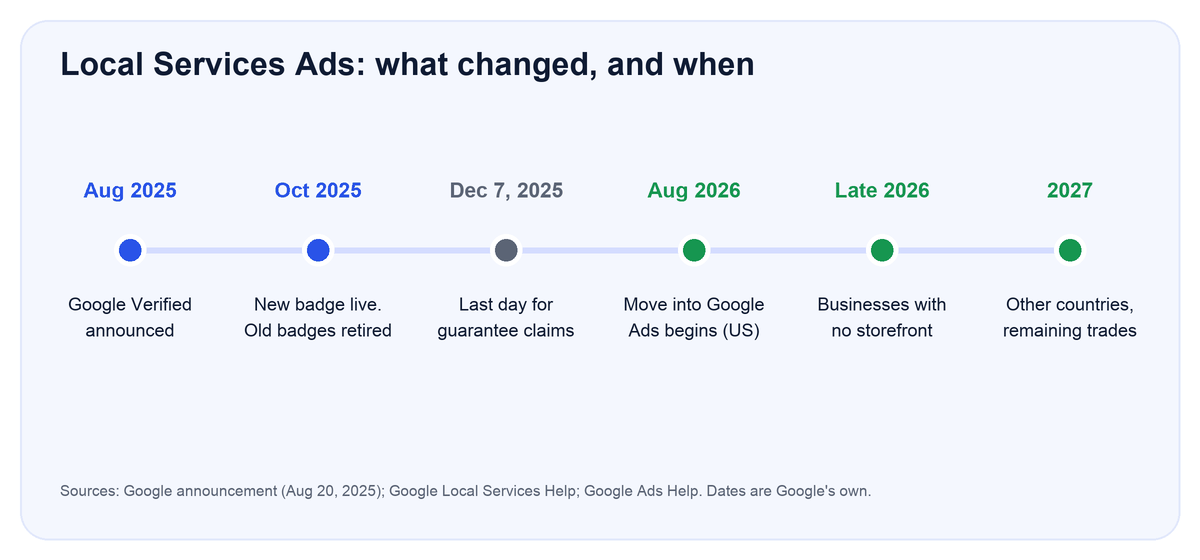
If you remember the green “Google Guaranteed” check mark, it is gone. On August 20, 2025 Google announced one badge, Google Verified, replacing Google Guaranteed, Google Screened, License Verified by Google and the Money Back Guarantee, starting October 2025.
- The money-back guarantee ended. Under the old program Google could reimburse a customer unhappy with a job booked through the ad. Google’s badge page says customers could still claim for services booked before December 7, 2025, within 30 days of the job. After that, nothing.
- The badge shows what was checked. It appears alongside the specific verification checks the business passed, and Google says it is shown “dynamically” when it predicts the badge will help a customer decide.
- Existing advertisers kept their status. Businesses that had completed verification were moved automatically. New advertisers must complete screening.
- Ranking did not change. Google’s page states “Local Services Ads ranking won’t be affected by this change.”
There is no fee for the badge on any Google page we opened, and the background checks are free. If an article or a salesperson still talks about “getting Google Guaranteed,” a $50 monthly badge fee or the customer guarantee, their information is out of date.
What Local Services Ads cost
Google does not publish a price list. Its “How leads work” page says the price “may vary depending on your location, the job type, the type of lead, or your bidding mode.” Message leads are priced on how likely the customer is to book and “typically” cost less than phone leads.
Budget. You set an average weekly budget. Google can go over it in a busy week, but your monthly maximum is fixed: weekly budget × 30.4 ÷ 7. A $100 weekly budget caps the month at about $434. When you hit the cap, the ad stops for the rest of the month unless you raise it. Google’s bidding page recommends a budget that covers at least 10 leads a week and says to give the system about two weeks before judging results.
Bidding. In the old dashboard there are three modes: Maximize Leads (Google sets the bid, and recommends this), Target cost per lead, and Max per lead (you set a ceiling). Once your account moves into Google Ads, manual bidding goes away (see the migration section).
What a lead actually costs. Be careful with the figures you see online. Most “cost per lead” ranges come from agency blogs with no stated source, and several still copy each other’s numbers. Two datasets we opened state their method:
| Trade | SearchLight Digital, Feb 2026 (888 contractors, 126,650 leads) | 99 Calls, Apr–Jun 2026 (own clients, vs same months 2025) |
|---|---|---|
| Electrical | $39 | $43 (up from $29) |
| HVAC | $51 | not reported |
| Plumbing | $57 | $66 (down from $70) |
| Drain / sewer | $59 | not reported |
| Roofing | not reported | $107 (up from $74) |
| Landscaping | not reported | $37 (up from $23) |
| Cleaning | not reported | $33 (up from $23) |
| Handyman | not reported | $39 (up from $25) |
| Appliance repair | not reported | $34 (up from $20) |
| Water damage | not reported | $215 (up from $172) |
| All home services | $53 | not reported |
Both are one vendor’s client accounts, not the market. SearchLight’s numbers are gross, before credits, and skewed to HVAC and plumbing. 99 Calls does not say how many accounts it counted. Twelve of the thirteen 99 Calls categories went up year on year, many by 30 percent or more. Treat all of it as a rough guide for your trade, not a price you will pay.
Cost per lead is the wrong number anyway. What matters is cost per booked job. SearchLight reports a 43.9 percent book rate across its accounts. Using their own figures, $53 a lead at that rate is about $121 per booked job. If you book one in four, the same lead price becomes $212 a job. Track every lead to a job or no job from the first week.
Owner reports put faces on the averages. On Pressure Washing Resource in May 2026, one owner was paying about $500 a month and turning down half the leads as too small; another in a competitive area got a single $30 message lead in two months; a third found Google recommended a $270 weekly budget in his rural home county and $3,500 a week in the dense county next door.
What counts as a chargeable lead (and the new missed-call rule)
Google’s “How leads work” page lists these as valid leads:
- You answer a call, or you call the customer back and speak with them.
- You miss a call during business hours and the caller stays on the line for more than 20 seconds.
- You receive a text message or email from the customer.
- You receive a voicemail.
- You receive a booking request (US and Canada).
Two more rules on the same page that help you:
- One charge per customer per 15 days. Once a lead is charged, follow-up calls or messages from the same number or email within 15 days are not charged again.
- Returning customers are not charged on brand searches. Your ad can show when someone searches your business name (Google calls this Direct business search). Callers are asked whether they are a returning customer, and if they say yes you are not charged. An HVAC contractor in Florida complained on Local Search Forum in 2023 about paying for existing customers who found the ad when looking up the phone number; that was before this screening existed. You can switch Direct business search off under Profile & budget if you prefer.
Google also charges when its system judges the lead valid, not when you win the job. Price shoppers, people who cancel, and callers you quote and never hear from again are all valid leads.
How to dispute a bad lead now
You cannot, in the old sense. The manual “Dispute” button was removed in 2024. Google’s lead credits page describes what replaced it:
- Google’s models assess every lead at first contact. Leads judged invalid or low quality are never charged.
- Charged leads are reassessed over about 30 days. If one is later judged low quality, it is credited automatically. Credits usually reach your balance within 30 days, and the original charge still appears on the invoice.
- Each lead shows a status: Not charged, Charged, In review, or Credited.
- Your one tool is Rate this lead (Leads, then the survey in the top right). Google says the feedback teaches the system what you want, and a lead rated through it may occasionally be credited as a “feedback bonus.” The page describes no appeal.
Two reasons are no longer credited at all. Google’s page states it “no longer supports credits for ‘job type not serviced’ and ‘geo not serviced’ leads.” If your settings let through a call for a service you do not do, or from a town you do not cover, you pay for it. Lead credits are also not available for health care, tax specialists, or advertisers in Europe.
That makes prevention the whole game:
- Untick every job type you do not want. A plumber who does not do drain cleaning should not have it on. Google’s performance page says to select every job type you perform; the flip side is to leave off the ones you do not.
- Set hours you can actually answer. A missed call during stated hours is now a charge. If nobody picks up after 5pm, your hours should end at 5pm.
- Match your service area to where you will drive. Google recommends whole counties over ZIP lists for reach, but every town inside the line is a town you can be charged for.
- Rate leads, good and bad, every week. It is feedback, not a dispute, but it is the only signal Google offers.
- Record outcomes outside the dashboard. Credits land up to 30 days later and the invoice still shows the charge, so your own job log is the only clean view of what the ads cost.
Owners are divided on the automated system. In February 2025 agencies and the local SEO consultant who runs Whitespark reported a rise in out-of-industry and out-of-city leads with no way to dispute them. Google’s Ads Liaison replied that the automated system credits more leads overall than manual disputes did, because most advertisers never filed them. Two cautionary stories from the old system still apply: an owner who disputed more than $300 of wrong-trade calls had every dispute denied (the moderator’s advice was that “job not served” never worked, while “wrong number or sales call” sometimes did), and a contractor who disputed heavily for months reported his ranking fell until leads stopped. Whether rating many leads “dissatisfied” affects ranking today is not stated on any Google page.
How to rank higher in the Local Services unit
Google’s “About ad rankings” page names two things, with sub-factors under the second:
- Your bid. The most you will pay for a lead. Google recommends Maximize Leads, and its bidding page says “bidding on leads can move your ad higher up results.”
- How likely your ad is to result in a lead, which depends on:
- Responsiveness. Google’s exact words: “Missed calls may negatively affect your responsiveness.”
- What the customer is searching for: the service, the timing and the location of the search.
- Business relevance: the services you list and your business bio.
- Lead types enabled: message and booking leads give customers more ways to reach you.
- Profile quality: rating, number of reviews, average response time, high-quality photos, completed verification checks and other business information.
Many guides still list “proximity, business hours and complaints” as named ranking factors. That is an older version of Google’s page. Location and timing now sit inside “what the customer is searching for.”
What to do with that:
- Answer the phone. Responsiveness is the first sub-factor Google names, and since October 2026 a missed call is also a charge. If you cannot staff the phone, shorten your hours rather than miss calls.
- Get past five reviews, then keep going. Google’s performance page says “we recommend 5 or more reviews” and that some business types need five before reviews show. Your Local Services reviews are your Google Business Profile reviews, so the review work you do for the map pack counts twice. On Local Search Forum, an agency with a client at about 100 reviews and 4.7 stars could not get past third place against competitors showing 1,000 to 5,000 reviews.
- Turn on message leads if you can reply within a day. Google may show your average response time on the ad.
- Add real photos of your team and trucks. Photos are reviewed before they publish.
- Set the service area broadly, by county. Google recommends it, and on the same forum thread a manager whose ads were invisible found switching from ZIP codes to town names helped.
If you are also working on the map pack itself, our guide to how to rank higher on Google Maps covers the review and profile work that feeds both.
Why your ad is not showing
“Verified, no issues, but not showing anywhere” is a common forum thread. Google’s own troubleshooting page gives three causes:
- The account is inactive. Check the ad schedule and Business Hours under Profile & budget, make sure the ad is toggled On, and look for targeting so narrow it blocks delivery.
- Account or billing problems. A declined card or an alert in the bell icon stops ads. A campaign under review, paused or inactive will not show.
- No budget left. Check the Budget spent card under Reports. If you have hit the monthly cap, raise it; if you are getting few impressions, switch to Maximize Leads.
Beyond those, the forum cases we opened point to three more: a lapsed license or insurance certificate (ads pause until it is replaced), an edit to your service areas or services that triggers a review (one attorney’s ads stopped for about two months after a service-area change), and a Google Business Profile that was suspended or edited by someone else. Keep a calendar reminder 30 days before every document expires.
The move into Google Ads
Google is moving Local Services Ads out of their own dashboard and into Google Ads, as a Performance Max campaign type that still charges per lead.
- August 2026: select US home and storefront advertisers. Google names plumbing, HVAC, electrical, appliance repair, house cleaning, lawn care, roofing, pest control and moving.
- Late 2026: service-area businesses without a storefront, and accounts with custom bidding or booking setups.
- 2027: accounts outside the US and remaining categories.
Google assigns your date, emails the account administrator 14 days before, sends a reminder at 7 days, and confirms when it is done. Allow up to two weeks for performance to settle afterwards.
What changes: you manage the ads inside Google Ads; the old dashboard redirects and cannot be opened. Your weekly budget ÷ 7 becomes a daily average, capped at 30.4 × that per month. Manual bidding (Max per lead) is no longer supported, and one campaign-level Target CPA replaces per-category targets. If you want different rules per trade, run separate campaigns. What stays: pay per valid lead, no keywords, the same positions on Search and Maps, and your verification and badge.
Google’s migration page does not say how lead credits or the rating survey work after the move, only that leads appear on a new Leads page in Google Ads with a charge status column.
Local Services Ads vs Google Ads
| Local Services Ads | Google search ads | |
|---|---|---|
| You pay for | Each valid lead (call, message, booking) | Each click |
| Where they show | Top of the page, with a badge; also on Maps | Under the Local Services unit, above the map |
| Targeting | Job types and service area. No keywords, no negatives. | Keywords you choose, negatives you add |
| Before you start | Verification, about 3–4 weeks | No verification of this kind |
| Where the customer goes | They call or message from the ad | To your website or landing page |
| Bad leads | Automatic credits only; wrong job type and wrong area not credited | No lead credits; you control the keywords instead |
| Your control | Low | High: wording, searches, pages, schedule |
| Reported cost per lead | $53 blended home services (SearchLight, Feb 2026) | $104 blended in the same dataset; $90.92 home services average in LocaliQ’s 2024–25 search benchmarks |
They are not rivals. Most contractors who run ads at all run both: Local Services Ads for the top spot and the badge, and search ads for the services, towns and hours where they want control, and for the branded searches Local Services cannot target. Our local SEO vs Google Ads comparison covers where paid fits next to the map pack. If you would rather not run either yourself, our Google Ads management service is $800 a month plus a $1,000 one-time setup, ad spend separate, and it includes managing your Local Services Ads alongside search ads.
Trade-by-trade notes
What Google’s requirements page lists for the most common contractor categories, plus the only dated cost data we could open. Insurance for all of these is general and professional liability; licenses are checked “where applicable by local law.”
| Trade | Background checks Google lists | Reported cost per lead |
|---|---|---|
| Plumber | Business and owner; business representative. Google notes plumbers get additional screening as an urgent category. | $57 (SearchLight, Feb 2026); $66 (99 Calls, Apr–Jun 2026) |
| HVAC | Business, owner and service professionals (field workers) | $51 (SearchLight) |
| Electrician | Business and owner, with additional screening as an urgent category | $39 (SearchLight); $43 (99 Calls) |
| Roofing | Business and owner; business representative | $107 (99 Calls), up 45 percent on the year |
| Pest control | Business and owner; business representative | Not in either dataset |
| Landscaping | Business and owner; business representative | $37 (99 Calls) |
| House cleaning | Business and owner; business representative | $33 (99 Calls) |
Three trade-specific notes from the forums: pressure washing is not its own category in every market and may be served through window cleaning or a general contractor category, which is what caught the window cleaner above at re-verification; small-ticket trades (pressure washing, one-room cleaning, a single outlet) are where owners most often say the lead price is not worth the job; and roofing, with the highest lead price in the 99 Calls table, is where the cost-per-booked-job maths matters most, because one roof pays for a lot of leads and one slow month does not.
What owners complain about, and what to do
| Complaint | What is behind it | What to do |
|---|---|---|
| “I get calls for work I don’t do and still pay.” | Wrong job type is no longer credited. | Untick every job type you do not want. Rate the lead anyway so the system learns. |
| “They charge for missed calls now.” | The October 2026 rule: 20 seconds on the line during your hours. | Set hours you can staff. If calls go through a menu, know that the clock starts at the key press. |
| “No negative keywords.” | By design. There is no keyword layer. | Use job types and area as your only filters, and run a search campaign for the fine control. |
| “My ad is verified but invisible.” | Budget cap hit, schedule, a paused review after an edit, or outranked on reviews. | Work through Google’s three checks, then reviews and response rate. |
| “The budget Google suggests is crazy.” | Suggestions follow local competition; one owner saw $270 vs $3,500 a week in neighbouring counties. | Set your own weekly budget from at least 10 leads a week at your trade’s lead price, and judge after two weeks. |
| “Disputes get denied.” | There are no disputes now, only automatic credits and a rating survey. | Keep your own job log and judge the ads on total spend against jobs won, net of credits. |
| “Background check has been stuck for weeks.” | Vendor delays, missing emails to technicians, name mismatches across documents. | Confirm every technician received the email, check that names match exactly, and escalate inside the same account rather than opening a new one. |
| “Fake profiles with thousands of reviews outrank me.” | Reported on Local Search Forum in 2024; reviews now come from Business Profiles. | Keep building your own reviews. |
Are they worth it? When to pause
Local Services Ads tend to suit a contractor when three things are true: a job is worth many times what a lead costs, someone answers the phone during the hours you list, and your service list is tight enough that the leads are for work you want.
They tend to disappoint when calls go to voicemail, when jobs are small, or when the service list and area are left broad.
The honest test is to run them for a set period with a budget you can afford to lose, log every lead to a job or no job, and compare total spend with work won. If that comes out wrong, you can pause: toggle the ad Off under Profile & budget (in Google Ads, pause the campaign), and the charges stop. Several owners on the forums run the ads only in slow months. Google’s pages we opened do not describe a pause fee, but check your own account terms, and keep your documents current for when you turn it back on.
Local Services Ads management is included in our Google Ads management, and the Google Business Profile that LSAs pull reviews from is kept in shape by the local SEO package. The pages for roofers, HVAC companies, plumbers, electricians and pest control companies cover which trades Google verifies and what it asks for.
Frequently asked questions
No. Google replaced Google Guaranteed, Google Screened and License Verified with a single Google Verified badge in October 2025. Businesses already verified were moved automatically.
Google publishes no price list; the price depends on your location, job type, lead type and bidding mode, and you set the weekly budget. One February 2026 dataset of 888 home-service contractors averaged $53 a lead, from $39 for electrical to $57 for plumbing. Roofing and water damage run far higher in other vendor data.
No. Google’s screening page says background checks are free to the business and we found no badge fee on any Google page. Your own license and insurance costs are separate.
Manual disputes were removed in 2024. Google credits invalid or low-quality leads automatically, usually within 30 days, and you can use “Rate this lead” to give feedback. Leads for a job type you do not offer or an area you do not serve are no longer credited, so tighten those settings.
Since October 1, 2026, yes, if the call comes during your stated business hours and the caller stays on the line more than 20 seconds. If your phone system requires a key press, the timer starts at the key press. Follow-up contacts from the same person within 15 days are not charged again.
Google says three to four weeks on average after you submit documents. A new D-U-N-S number alone can take up to 30 days, and forum reports of eight-week background-check delays exist.
Google names your bid and how likely your ad is to produce a lead: responsiveness (missed calls hurt), match to the search, your listed services, message and booking leads switched on, and profile quality (rating, review count, response time, photos, completed checks).
No. They are moving into Google Ads as a Performance Max campaign that still charges per lead. The move began in August 2026 for US home services and continues into 2027 for other countries and categories.
Yes. Google requires a public, verified profile matched to the ad account. Your reviews, name, hours and phone number come from it. Our Google Business Profile management page explains what we do there for clients.
Yes, any time. Toggle the ad Off under Profile & budget, or pause the campaign in Google Ads. Charges stop. Keep your license and insurance current for when you turn it back on.
Sources
- Google Local Services Help, How leads work (valid leads, 20-second missed-call rule, 15-day rule, pricing factors, call recording)
- Google Local Services Help, About automated lead credits
- Google Local Services Help, About ad rankings
- Google Local Services Help, Screening and verification process and requirements by category
- Google Local Services Help, About the Google Verified badge; Google, Google Verified announcement (August 20, 2025)
- Google Local Services Help, About budgets, bidding modes, improving performance, Direct business search and why ads may not show
- Google Ads Help, Local Services Ads moving into Google Ads
- PPC Land, Google LSA advertisers face missed-call charges from October 1 (August 2026); Search Engine Roundtable, lead quality and Google’s response (February 2025)
- SearchLight Digital, LSA cost per lead by trade (own client data, February 2026); 99 Calls, LSA cost per lead by industry, 2025 vs 2026 (own client data); LocaliQ, home services search advertising benchmarks (search ads only)
- Owner reports: Pressure Washing Resource (May 2026); Window Cleaner community (2025); Local Search Forum threads on ads not showing, brand-search charges, denied disputes and a stuck background check
Results vary by industry, city, and local competition.