

- By Wrenlocal
- Google Business Profile
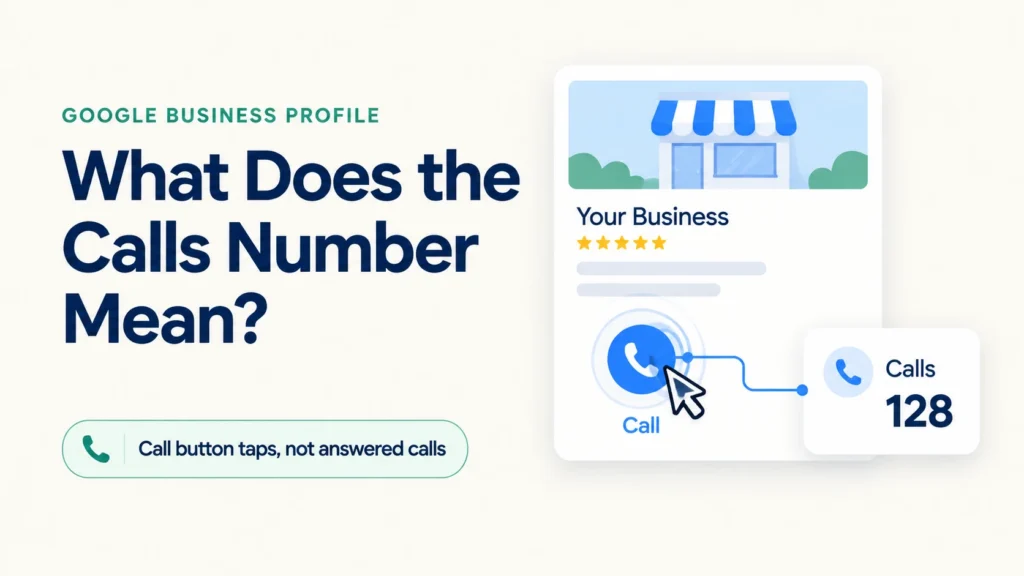
Quick answer: open your Business Profile, choose Performance, and look at Calls. Google defines it as the number of times a customer clicked the call button on your profile. It is not answered calls, completed calls or booked jobs, and there is no list of callers anymore. Use it as a trend, compare it with the same months last year, and check it against your own phone log.
Below: the exact steps on desktop and phone, what the number does and does not include, why it never matches your phone, what happened to call history, what to do when it drops, how to tell real Google calls from scams, and a simple log that connects calls to jobs.
- Where to find your calls
- Does Google call you to verify your business?
- What the number counts, and what it does not
- Why Google shows fewer (or more) calls than you got
- What happened to call history
- The other numbers beside it
- Compare with last year, not last month
- Calls look lower? Check in this order
- Tracking the calls Google cannot see
- Connect calls to jobs with a simple log
- Call button missing, or wrong number showing
- What can move the number
- Frequently asked questions
- Sources
Where to find your calls
The report is called Performance. Google’s help page gives these steps, and you must be signed in to the Google Account that manages a verified profile.
On a computer
- Go to your Business Profile at business.google.com while signed in to the managing account.
- Click Performance.
- Pick a time period at the top and click Apply. Calls shows up alongside website clicks, directions and the other interactions that apply to your business.
On a phone (Google Maps app)
- Open the Google Maps app.
- At the bottom right, tap Business.
- Next to “Performance,” tap See more.
- Choose a time period and tap Apply.
Two details people trip over. First, Calls only appears if your profile has a phone number, because Google says you need to add one to track the metric. Second, the report covers Search and Maps and includes activity from both free results and Google Ads, so paid placements can be inside the number.
Several agency guides say the report goes back about six months by default. Google’s help page does not state a lookback window, so check the date picker on your own profile, and save your numbers somewhere each month if you want a longer history. To pull numbers for several locations at once, Google’s page describes a download: in Business Profile Manager, select the profiles, click Actions, then Insights, pick a timeframe and download the report.
Does Google call you to verify your business? Real calls vs scams
Short answer: sometimes, but rarely the way scam callers say. Search for this topic and you will find as many pages about spam calls as about the Performance report. If you got a call about your listing, here is what Google says. Google may use automated calls, texts or WhatsApp to confirm details such as hours or services, and says these do not affect your account standing. Google’s automated calls come from a set of designated numbers, and a real caller says who they are and why they are calling.
Google also says it will never ask for payment, credit card information or account passwords, and that it will not guarantee a special placement. If a caller says your listing will be removed unless you pay, or tells you to press a button, it is not Google. Hang up, do not press anything, and sign in to your profile yourself to check its status.
To stop automated Google calls, say so on the call, or in Business Profile settings go to Advanced settings and use “Google automated calls and text messages.” You may still get an occasional manual confirmation call. To report scam calls, Google points to the FTC (donotcall.gov, or ReportFraud.ftc.gov for texts).
On verifying by phone: Google offers phone or text verification, email, live video call and postcard, but it decides which of these your business gets, and you cannot choose. You do the verifying yourself from inside your Business Profile, not by waiting for a call. If you see a “call or text” option, the code goes to the business number you listed, and an automated phone system will not receive it.
What the number counts, and what it does not
Google’s definition is one sentence: the number of times a customer clicked on the call button on your Business Profile. That is all it measures.
| Counts as a call | Does not show up as a call |
|---|---|
| Someone taps the call button on your profile | Someone who reads your number and dials it by hand |
| A tap where the caller changes their mind before dialing, according to practitioner write-ups | Calls that came from your website, truck, lawn sign or a saved contact |
| A tap where the caller hangs up before it connects, according to forum answers | Whether anyone answered, how long it lasted, or whether it became a job |
Notice the middle rows. Google’s current definition counts clicks, so it does not say what happens to a tap that never connects. Practitioners say it can still be logged. A forum moderator on Local Search Forum put it this way years ago: Insights is a rough guide and not highly precise. A guide from Sterling Sky says a call click does not necessarily mean a completed phone call, and suggests calling the metric “call clicks.”
So the number can be higher than the calls you actually received (a tap that did not connect) and lower than the calls Google really sent you (people who dial from a screenshot or a copied number). Treat it as a direction indicator, not an exact count.
Why Google shows fewer (or more) calls than you got
This is the most common complaint. A thread in Google’s own Business Profile community from February 2026 has a poster saying they get more calls from their profile than the dashboard reports, and that the gap is fairly high. A Local Search Forum thread started the same way: a client saw calls in Insights but said they had not received that many. These are the usual reasons, in order of how often they come up:
- Desktop callers. The metric is a count of taps on the call button. A person who finds you on a laptop and dials from their phone is not counted. One forum answer says the count only includes taps from mobile devices, and an agency guide says it mostly captures smartphone users.
- Manual dialing. Someone who copies your number, writes it down or remembers it is not counted either.
- Other sources. Your website, directories, yard signs, trucks and past customers send calls Google never sees.
- Taps that never became calls. These are the reason the Google number can be higher than your phone log on some days.
- Ads mixed in. The report includes both free and ad activity.
- A wrong or dead number on the profile. If the number is wrong, you will see taps but receive nothing, or the reverse. Look at the number the call button actually dials before you blame the report.
Be careful with any article that gives a percentage for how many real calls the report captures. We found no current, sourced figure from Google. One expert’s 2018 comment on Sterling Sky’s explainer mentions a test that suggested a share, but it is a six-year-old comment, not a published study, so we are not repeating it as a rule. Your own phone log is the better benchmark.
What happened to call history
Many articles still ranking for this topic describe a “Calls” tab that listed individual calls with a time and a caller number. That was call history, an older feature, and it is gone. Google’s notice says that as of July 31, 2024, the chat and call history features are no longer available in your Business Profile. You still receive calls from your profile, and you can still see engagement metrics.
| Date | What happened |
|---|---|
| July 2023 | Agencies on Local Search Forum reported the call history controls missing from profiles. Users could not find the on/off setting, and several complained that they lost lead attribution. |
| July 31, 2024 | Google ended chat and call history in Business Profile. Past records could be downloaded through Google Takeout until August 30, 2024. |
| Aug 7 to 9, 2024 | The Calls section briefly vanished from the Performance report for some users, then came back. Search Engine Roundtable reported it back on August 9, and a forum moderator confirmed seeing it again. |
Two practical notes from Google’s notice. If you had call history on, the call button now switches from the Google forwarding number to the number you supplied. And if you want the old call records, that window has closed, so do not pay anyone who promises to recover them.
What you have now is totals only, not a list of callers, and no record of missed calls. If you need that, you need your own phone system or a call tracking number.
The other numbers beside it
Calls rarely tells the story alone. Read it next to these, using Google’s own definitions:
| Metric | What Google says it counts | What a change may mean |
|---|---|---|
| Calls | Times a customer clicked the call button | Interest from people who found you on Google |
| Website clicks | Times people clicked your website link | People who wanted to read first |
| Directions | People who asked for directions to your business | Matters most when your address is shown, so customers can find you |
| Messages | Separate message conversations, where available | People who prefer to write, though chat was removed in 2024 |
| Bookings | Completed bookings through a booking provider | Only relevant if you take bookings there |
| Views | People who viewed your profile on Search and Maps, counted once per person per day | Visibility: more views means more chances to tap |
| Searches | The search terms people used to find you | What you show up for, updated monthly |
Google notes that views can be lower than the counts in your profile or email notifications because it counts unique visitors and each person once per day. If views and calls both fall, fewer people are seeing you. If views hold but calls fall, people see you but fewer tap, which points to the profile itself: the phone number, reviews, photos, hours, or how you compare with the two businesses beside you. Our Google Business Profile checklist for contractors walks through those items.
Compare with last year, not last month
Home services are seasonal. Looking at this month against last month will usually show a rise or fall that has nothing to do with how well your profile is doing. The cleaner comparison is the same months last year. Google also notes that its Views metric now counts unique visitors once per day, so be careful comparing old screenshots of other metrics with today’s numbers.
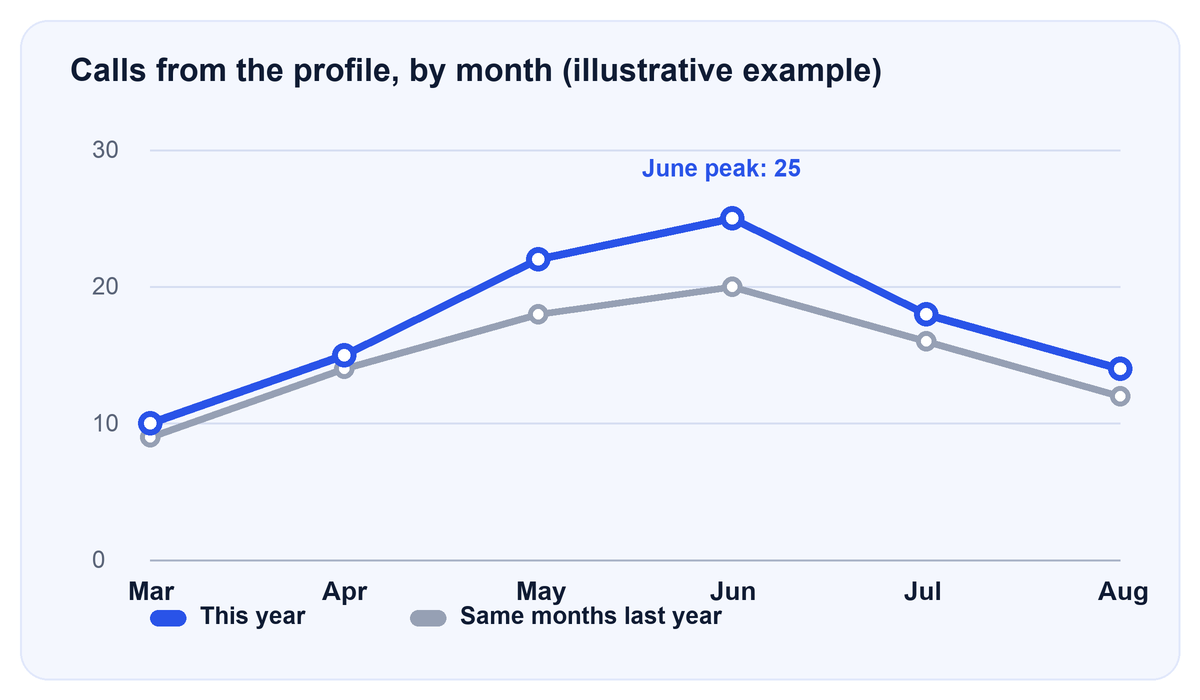
In this example, calls rise and fall with the season both years. Looked at month to month, July looks like a collapse (25 down to 18). Looked at year over year, July is actually higher than last July (18 against 16). The seasonal drop is normal; the year-over-year gap is the signal.
How to do it in ten minutes:
- Set the date range to a full month (not the month in progress).
- Write the Calls number down. Repeat for the same month last year, if the report still shows it.
- Do the same for the last six or twelve months in a small table.
- Look at the gap each month, not the swing from one month to the next.
We did not find reliable seasonality data by trade, so we are not going to hand you a percentage. Your own history is the benchmark that matters.
Calls look lower? Check in this order
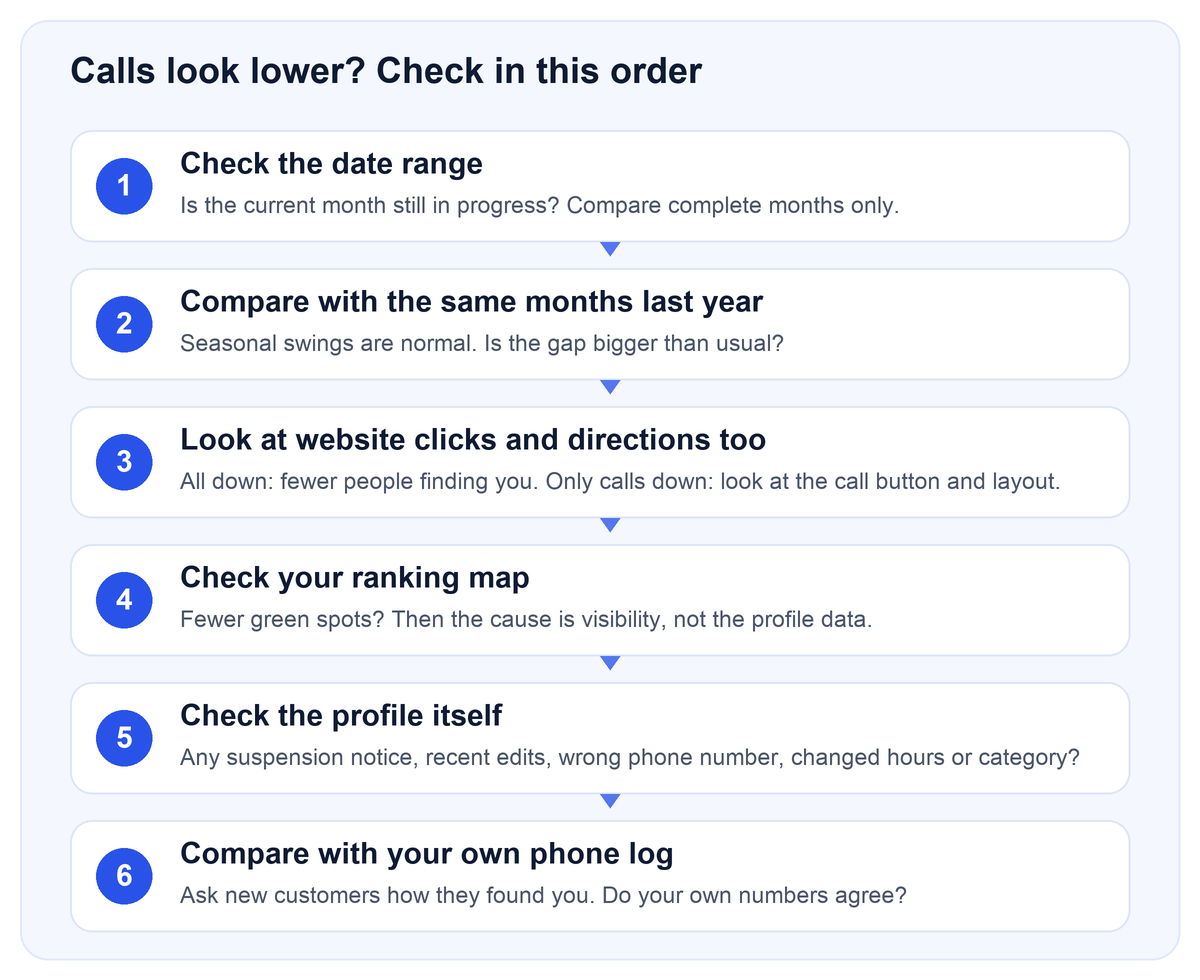
Most “my calls dropped” worries come from steps one and two. Work through them in order before changing anything.
- Date range. A month still in progress will always look low.
- Same months last year. A seasonal dip is not a problem.
- Other interactions. If website clicks and views also fell, visibility dropped. If only calls fell, look at the profile.
- Your ranking map. Fewer green spots means you are showing up in fewer places. Our guide on how to read a Google Maps ranking map explains what to look for, or you can request a free ranking report.
- The profile itself. Check for a suspension or verification notice, a recently changed category or hours, and a phone number that is wrong or no longer answered. A thread on Local Search Forum describes a profile whose call button sent callers to a wrong or disconnected number and could not be changed.
- Your own phone log. If your real calls have not dropped, the profile number may simply be tracking a different slice.
A word on the 2026 “Google is hiding the call button” claims. Some agency posts say Google changed where the call button appears and that this cut taps. We could not find a Google source for that, so treat it as a theory. The part you can check yourself is whether the button shows on your profile and dials the right number.
Tracking the calls Google cannot see
If you need every call from Google, not just button taps, the usual answer in forums and agency guides is a call tracking number. Vendor guides describe it like this: put the tracking number in the primary phone field and your real number in an additional field. Google’s help page says you can add up to two more numbers (mobile or landline, no fax) beyond the primary one, but it does not mention call tracking at all.
That means a few things you should know before you do it:
- It is common practice, not a Google-documented method. A Local Search Forum thread asking whether this is best practice got one reply agreeing, so it is a practitioner view, not a rule.
- Google’s guidelines say the number must be under the direct control of the business and should be a local number that connects to your location. They also say premium numbers are not acceptable.
- The claim that keeping your real number as an additional number protects name, address and phone consistency is a vendor argument, not a Google statement.
- A tracking number does not recover old calls. It only counts from the day you set it up.
- If you run Google Ads, calls from ads are reported inside Google Ads, not as a separate Business Profile figure, so expect the two reports not to match.
If calls are how your business makes money, a tracking number plus the log below gives you real data. If you only want a rough read on direction, the Performance number plus your phone log is enough.
Connect calls to jobs with a simple log
The Calls number cannot tell you which calls became work. A paper or spreadsheet log can. Keep one row per call for a month:
| Date | How they found us (ask) | Job type | Booked? | Job value |
|---|---|---|---|---|
| Oct 2 | Google Maps | Roof repair | Yes | $1,850 |
| Oct 2 | Referral | Estimate | No | – |
| Oct 3 | Google search | Emergency leak | Yes | $420 |
The rows above are an example of the layout only. After a month, compare the number of calls you logged as “Google Maps” or “Google search” with what Performance reports. They will not match exactly, and that is fine. What you are checking is whether the two move together.
If you pay for marketing, a log is also the simplest way to see what you are getting. Our Google Business Profile management includes lead follow-up and review requests, and our pricing page lists the plans: Fully Managed Local SEO is $597 a month, website included, month to month. Results vary by industry, city, and local competition.
Call button missing, or wrong number showing
If there is no call button, or it dials the wrong place, the Calls report cannot be right either. Check these:
- Is there a phone number at all? Google says you need to add one to track Calls. Add it in Edit profile, then Contact.
- Is the number hidden? Google says you can hide your phone number. One guide describes the path as Edit profile, the three-dot menu, Business Profile settings, Advanced settings, then the Phone number “Don’t show” toggle.
- Is the profile verified? Performance data is available only for verified profiles.
- Did you change it recently? Phone edits can be held for Google review, so a new number may take a short while to appear.
Then place a test call from your own profile on a phone and see what rings.
What can move the number
Two kinds of claims circulate about this. We separate them.
Confirmed by Google
- The number is clicks on the call button, and you need a phone number on the profile.
- Call history and chat were removed on July 31, 2024.
- Performance includes activity from free results and ads.
- Performance is available only for verified profiles.
Industry observations, not confirmed by Google
- More complete profiles, fresh photos and more reviews tend to be associated with better local visibility. This is practitioner opinion, not a published guarantee.
- Whether a tap that never connects is counted. Forum answers say yes, Google’s current wording does not say.
- Claims that Google moved the call button in 2026 to push paid ads. We found no Google source.
We have deliberately left out percentage claims we could not source, such as how many profile views become calls or what share of your real calls the profile captures. Anyone quoting a single number for those is guessing. Results vary by industry, city, and local competition. If you want a second pair of eyes on your numbers, request a free ranking report.
Calls are the number our local SEO package is judged on, so we report it every month next to the profile changes we made. See how we handle it for HVAC companies, pest control companies and roofers, or what a contractor website design that is built to get calls looks like.
Frequently asked questions
Sign in at business.google.com and click Performance, or in the Google Maps app tap Business, then See more next to Performance. Pick a time period and apply it. You need a verified profile with a phone number.
No. Google ended chat and call history on July 31, 2024, and past records were only downloadable through Google Takeout until August 30, 2024. Performance now shows totals, not a list of callers.
It counts clicks on the call button, so it does not tell you whether the call was answered or missed. Practitioners say a tap that never connected can still be counted.
People also call from your website, a saved contact, your truck or a sign, or after copying your number. Desktop viewers who dial by hand are not counted either. Only taps on the profile’s call button are.
Google says Performance includes actions from both organic results and Google Ads. If you run ads, part of the number may come from them. If you want help with paid calls, see our Google Ads management page.
Home services are seasonal. Compare with the same month last year before deciding something is wrong, and wait until the month is over.
The most common causes are no phone number, a number set to “Don’t show” in Advanced settings, an unverified profile, or an edit still waiting for review.
Google offers phone or text verification to some businesses, but Google decides which verification methods you get, and you start it yourself inside your profile. An unexpected robocall asking you to press a key or pay is not Google. Hang up and check your profile directly.
Sometimes. Google lists phone or text, email, live video call and postcard as methods, and shows only the ones your business is eligible for. The code goes to the business number on the profile, and an automated phone system cannot receive it.
Most repeat calls that mention your listing are sales or scam calls that use public profile data. Google says it never asks for payment or passwords and does not guarantee placement. You can report them to the FTC, and real Google automated calls can be turned off in Advanced settings.
Add your phone number under Edit profile, then Contact, and make sure it is not set to “Don’t show” in Advanced settings. Verified profiles only. See the call button section above.
It can be. Google may place automated calls to confirm details like hours. But Google says it never asks for payment, card numbers or passwords, so any caller demanding money to keep your listing is a scam.
Not from Google’s number. Use a call log, ask each caller how they found you, or set up a tracking number. Vendor guides put the tracking number in the primary field and your real number as an additional one, though Google’s help page does not address call tracking.
Sources
- Google Business Profile Help: view performance and interactions
- Google Business Profile Help: performance data and date ranges
- Google Business Profile Help: changes to chat and call history
- Google Business Profile Help: add or hide a phone number
- Google Business Profile guidelines: website and phone
- Google Business Profile Help: automated calls and texts to your business
- Google Business Profile Help: protect against fraudulent calls and texts
- Search Engine Roundtable: call data missing from the Performance report (Aug 2024)
- Sterling Sky: how to interpret the Performance report
- Igniting Business: is the Performance report accurate?
- Local Search Forum: Google Insights reported calls, is it accurate?
- Local Search Forum: Google removing call history feature on GBP?
- Local Search Forum: GBP call history, any solutions?
- Local Search Forum: call performance metrics are back
- Local Search Forum: tracking numbers in Business Profiles
- 800.com: add call tracking to a Business Profile (vendor guide)
- GMB Briefcase: enable or disable the call button
Last reviewed October 20, 2026. Google changes the Business Profile interface often; if your screen looks different, search Google’s Help Center for the current steps.