

- By Wrenlocal
- Google Business Profile
Quick answer: the Calls number in your Google Business Profile counts how many times people tapped the call button on your profile. It does not count answered calls, completed calls, booked jobs, or calls from people who found your number somewhere else. Treat it as a measure of interest, compare it with the same months last year, and match it against your own phone log before you decide anything.
Below: where to find the number, what each metric beside it means, how to compare months without fooling yourself, what to check when it drops, and a simple log that connects calls to jobs.
Where to find your calls
Google replaced the old “Insights” tab with a Performance report in 2023. Much of the advice still ranking for this topic is older than that, which is why the steps people describe often do not match what you see.
- Search your business name on Google while signed in to the account that manages the profile, or open the Google Maps app and tap your profile.
- Choose Performance (on a phone you may see it listed in the profile menu).
- Pick a date range. Google shows the interactions customers had with your profile, including calls, website clicks, directions, messages and bookings where they apply.
The Performance report includes activity from both free results and ads, so the number can include people who reached you through paid placements.
What the number counts, and what it does not
This is the part most people get wrong. Calls is a count of taps on the call button from your Business Profile on Search or Maps. That is all Google measures.
| Counts as a call | Does not show up as a call |
|---|---|
| Someone taps the call button on your profile | Someone who copies your number and dials it later |
| A tap that never connects | Calls that came from your website, truck, or a past customer’s phone |
| A tap where the caller hangs up on the first ring | Whether anyone answered, or whether it turned into a job |
So the number can be higher than the calls you actually received (a tap that did not connect still counts) and lower than the calls you got from Google overall (people who dial from a screenshot are not counted). It is a direction indicator, not an exact count.
What happened to “call history”
Google used to list individual calls, with time and caller details, inside the profile. That call history and chat were removed on July 31, 2024. If an article tells you to open “Calls” and view a list of callers, it is describing something that no longer exists. You now see totals only.
The other numbers beside it
Calls rarely tells the story alone. Read it next to these:
| Metric | What it counts | What a change may mean |
|---|---|---|
| Calls | Taps on the call button | Interest from people who found you on Google |
| Website clicks | Taps on your website link | People who wanted to read first before calling |
| Directions | Requests for directions to your location | Mostly matters if customers visit you (many contractors hide their address) |
| Messages | Messages sent from the profile, where available | People who prefer text over a call |
| Bookings | Bookings made through the profile, where available | Only relevant if you take bookings there |
| Searches | How many searches showed your profile | Visibility: more searches means more chances for a tap |
If searches and calls both fall, fewer people are seeing you. If searches hold but calls fall, people see you but fewer tap, which points to the profile itself (the phone number, reviews, photos, hours or how you compare with the other two businesses beside you).
Compare with last year, not last month
Home services are seasonal. Looking at this month against last month will usually show a rise or fall that has nothing to do with how well your profile is doing. The cleaner comparison is the same months last year.
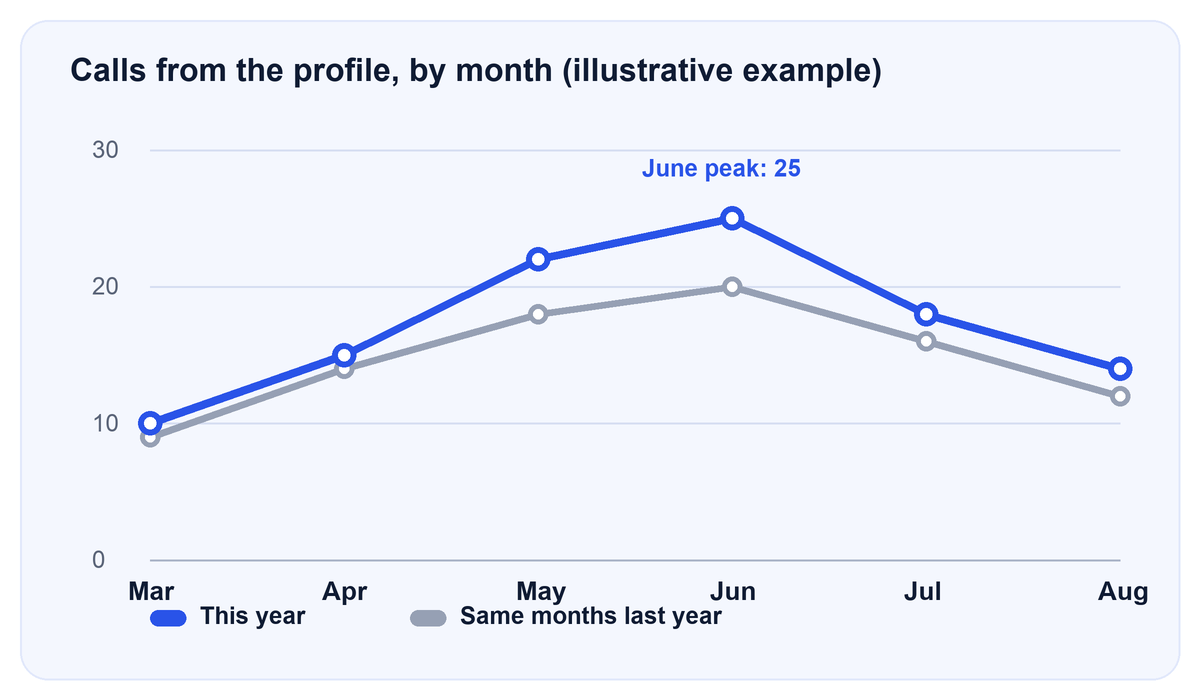
In this example, calls rise and fall with the season both years. Looked at month to month, July looks like a collapse (25 down to 18). Looked at year over year, July is actually higher than last July (18 against 16). The seasonal drop is normal; the year-over-year gap is the signal.
How to do it in ten minutes:
- Set the date range to a full month (not the month in progress).
- Write the Calls number down. Repeat for the same month last year.
- Do the same for the last six or twelve months in a small table.
- Look at the gap each month, not the swing from one month to the next.
We did not find reliable seasonality data by trade, so we are not going to hand you a percentage. Your own history is the benchmark that matters.
Calls look lower? Check in this order
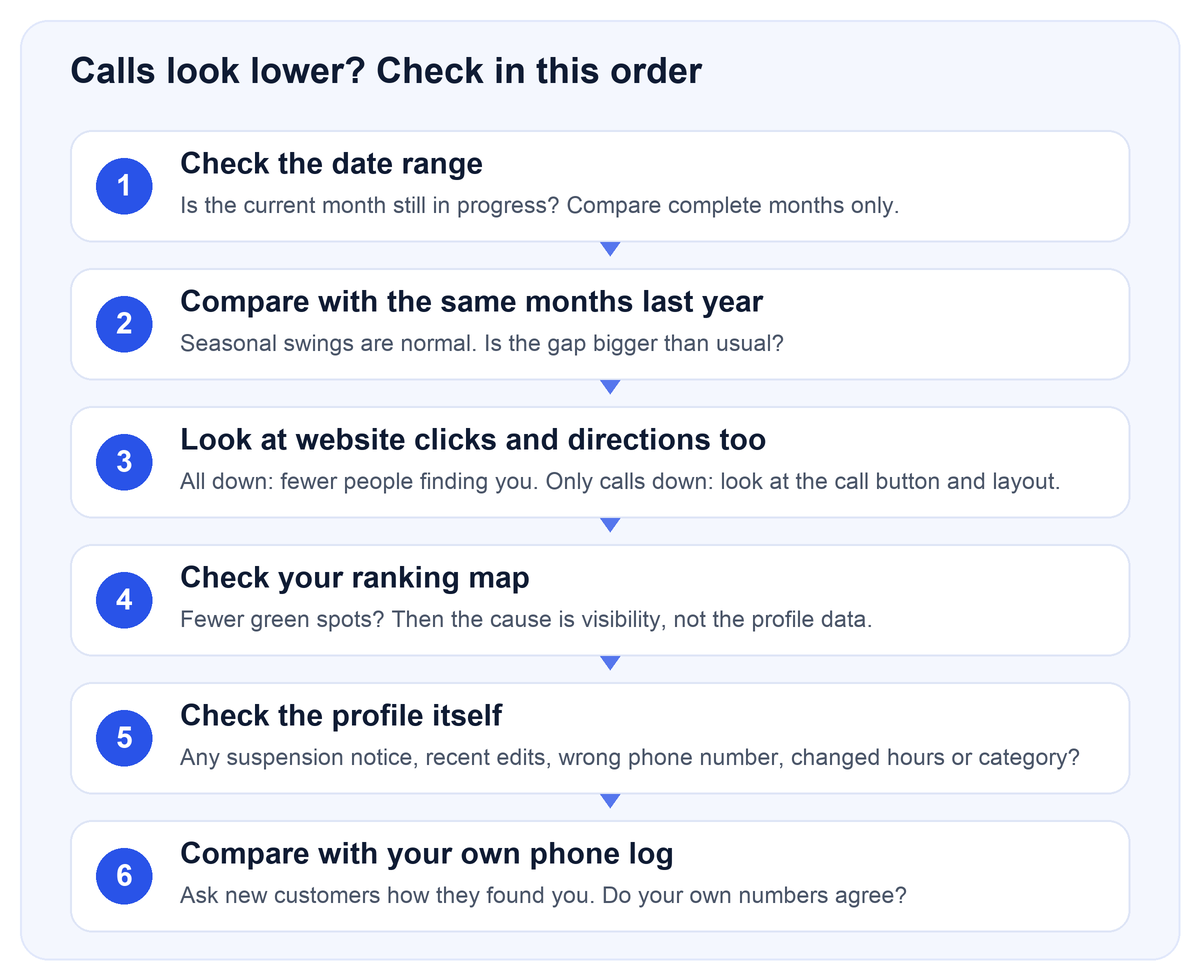
Most “my calls dropped” worries come from steps one and two. Work through them in order before changing anything.
- Date range. A month still in progress will always look low.
- Same months last year. A seasonal dip is not a problem.
- Other interactions. If website clicks and searches also fell, visibility dropped. If only calls fell, look at the profile.
- Your ranking map. Fewer green spots means you are showing up in fewer places. Our guide on how to read a Google Maps ranking map explains what to look for, or you can request a free ranking report.
- The profile itself. Check for a suspension or verification notice, a recently changed category or hours, and a phone number that is wrong or no longer answered.
- Your own phone log. If your real calls have not dropped, the profile number may simply be tracking a different slice.
Connect calls to jobs with a simple log
The Calls number cannot tell you which calls became work. A paper or spreadsheet log can. Keep one row per call for a month:
| Date | How they found us (ask) | Job type | Booked? | Job value |
|---|---|---|---|---|
| Oct 2 | Google Maps | Roof repair | Yes | $1,850 |
| Oct 2 | Referral | Estimate | No | – |
| Oct 3 | Google search | Emergency leak | Yes | $420 |
The rows above are an example of the layout only. After a month, compare the number of calls you logged as “Google Maps” with what Performance reports. They will not match exactly, and that is fine. What you are checking is whether the two move together.
If you pay for marketing, a log is also the simplest way to see what you are getting. When you work with us, this is part of the monthly reporting, and the pricing page lists what is included.
What can move the number
Two kinds of claims circulate about this. We separate them.
Confirmed by Google
- The number is taps on the call button, not answered calls.
- Call history and chat were removed on July 31, 2024.
- Performance includes activity from free results and ads.
- Local results depend on relevance, distance and prominence, and you cannot pay for a better local ranking.
Industry observations, not confirmed by Google
- More complete profiles, fresh photos, and more reviews tend to be associated with better local visibility. This is practitioner opinion, not a published guarantee.
- Responding quickly to calls and reviews is widely recommended, but we found no independent data on how much it changes the Calls number.
We have deliberately left out percentage claims we could not source, such as how many profile views become calls or what share of your real calls the profile captures. Anyone quoting a single number for those is guessing. Results vary by industry, city, and local competition.
Frequently asked questions
Where did the call history go in Google Business Profile?
Google removed call history and chat from Business Profiles on July 31, 2024. You can still see totals in the Performance report, but not a list of individual callers.
Does the Calls number include missed calls?
It counts taps on the call button, so a tap that never connected, or that you missed, can still be counted. It does not tell you whether the call was answered.
Why are my Business Profile calls lower than the calls I actually got?
People also call from your website, from a saved contact, from your truck or a lawn sign, or after copying your number from the profile. Only taps on the profile’s call button are counted.
How do I see calls in the Google Maps app?
Open the app, go to your profile, and choose Performance. You can select a date range and view calls alongside other interactions.
Why do my calls drop in some months?
Home services are seasonal. Compare with the same month last year before deciding something is wrong.
Does this include calls from ads?
Google says the Performance report includes activity from both free results and ads.
How often does the number update?
Search numbers update at the start of the month and can take up to five days. Interaction totals appear for the range you pick.
Can I tell which calls became jobs?
Not from Google’s number. Use a call log, ask each caller how they found you, or use a tracking number if you set one up.
Sources
- Google Business Profile Help: view performance and interactions
- Google Business Profile Help: changes to calls and chat
Last reviewed October 3, 2026. Google changes the Business Profile interface often; if your screen looks different, search Google’s Help Center for the current steps.