


- By Wrenlocal
- Google Business Profile
Quick answer: a Google Business Profile checklist for a contractor comes down to six things: your real business name, the most specific primary category, your real address shown with the service areas you cover, a profile that is verified and complete, real photos of real jobs, and genuine reviews that you answer. Do the setup once, then spend about 30 minutes a month keeping it current.
This checklist is written for contractors who drive to the customer: roofers, HVAC, plumbing, electrical, pest control, paving, fencing, painting, landscaping and remodeling crews. It is ordered by when to do each step, and it covers the things most checklists skip: passing verification with no storefront, what gets a profile suspended, what to do about fake competitors and fake reviews, and a 100-point scorecard so you can grade your own profile in ten minutes.
- How the profile ranks, and what is gone
- Day one: foundation and verification
- Show your address and set your service areas
- This week: fill in the profile
- A photo shot list for contractors
- Reviews: ask, reply, report
- Every month: a 30-minute routine
- What gets a profile suspended, and how to appeal
- Fake competitors and fake reviews
- What to skip
- Score your own profile (100 points)
- Frequently asked questions
- Sources
How the profile ranks, and what is gone
Google says local results are based mainly on relevance (how well a profile matches the search), distance (how far the business is from the searcher) and prominence (how well-known the business is). It also says: “There’s no way to request or pay for a better local ranking on Google.” Your profile can improve relevance and prominence. It cannot change how far you are from the person searching. Our guide to reading a Google Maps ranking map shows what that looks like block by block.
For what experts think matters most, the best public source is Whitespark’s Local Search Ranking Factors, published November 6, 2025. It is a survey of 47 local search experts scoring 187 factors. For the local pack and Maps, the top of the list is: primary category (1st), proximity of the address to the searcher (2nd), keywords in the business title (3rd), physical address in the city of search (4th), business open at the time of search (5th), high star ratings (6th), address showing on the profile rather than hidden (7th), additional categories (8th), number of Google reviews with text (9th) and recency of reviews (11th). That is expert opinion, not a Google statement. Two warnings for contractors: keywords in the business title help only in the sense that experts see them working, and adding them breaks Google’s naming rules, so do not do it. And the address factors are the reason service-area businesses lean harder on categories, reviews and everything else on this list.
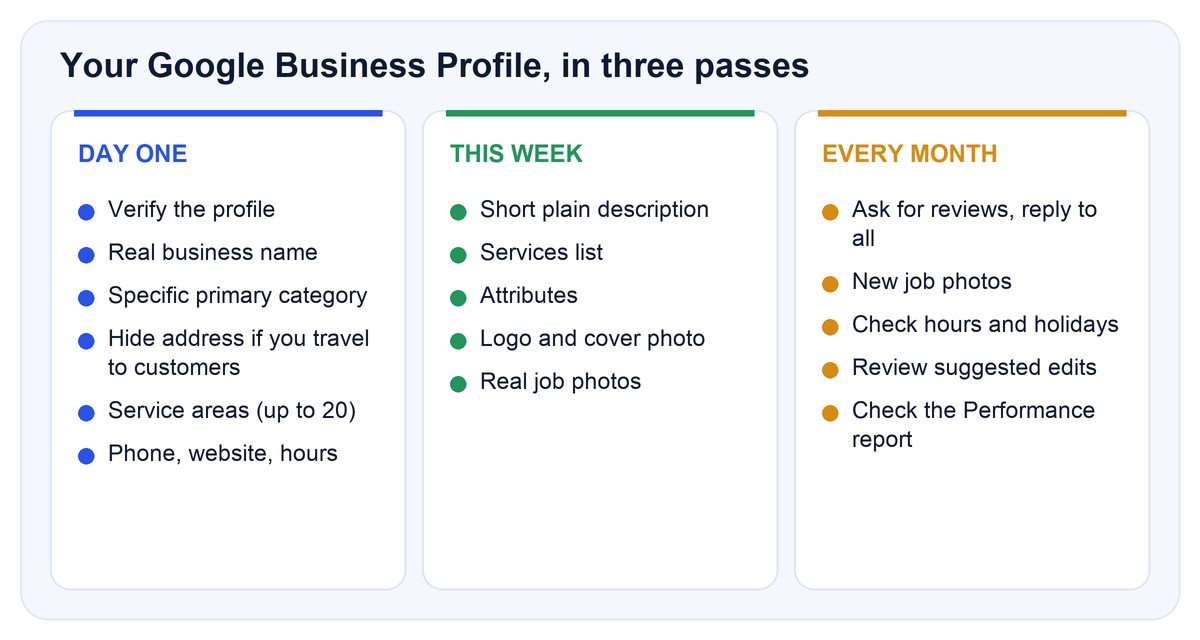
Day one: foundation and verification
- Use your real business name. Google says the name should reflect your real-world name, as it appears on your signs, website and stationery. Do not add taglines, phone numbers, URLs, service descriptions or location details. Fully capitalized names and legal endings such as LLC or Inc. are generally not allowed unless you can show real-world proof such as signage or invoices. “Smith Roofing”, not “Smith Roofing LLC | Best Roofer in Dallas”.
- Pick the most specific primary category. Google says to use as few categories as possible and the most specific ones available. Your first category is your primary one, and you can add up to 9 more. Think “This business IS a…”, not “This business HAS a…”. Open the dashboard and read the exact names offered for your trade rather than guessing. Per Whitespark, the primary category is the number one local pack factor, so spend time here.
- Show your real address and set your service areas. We do not recommend hiding the address, even if you travel to your customers. Details in the next section.
- Add a local phone number and your website. Google asks for a number that connects to your business and that you control. Both should go to you, not to another business or a social page. Test both from your phone.
- Set your regular hours. Whitespark ranks “open at time of search” 5th, and its author warns not to list hours other than what they actually are. Add special hours for holidays.
- Verify. Photos and videos show on Google only after you verify. See the verification notes below.
Verification when you have no storefront
Google lists several methods and shows only the ones your profile qualifies for: phone or text, email, live video call, postcard, and a recorded video. Automatic verification is possible for some profiles through Search Console. After you finish the steps, Google says review can take up to 5 business days, and sometimes longer.
If Google offers the video recording, this is what its help page asks for from a service-area business:
- Where you are: street signs, nearby landmarks or other identifiers at your business address. Empty land or places with no clear markers are a problem.
- That the business is real: the tools, equipment or products you use for work.
- That you run it: film yourself doing a service or opening business-only assets. A business permit, invoice or utility bill with the same name as your profile also counts.
- Format: at least 30 seconds, one unedited, live recording with no breaks. No bank, tax or ID numbers, no private information, and no other people’s faces.
Postcards usually arrive within 14 days and the code expires after 30 days. After you request one, do not edit your name, address or category and do not request a second code, or the first may stop working.
Show your address and set your service areas
We do not recommend hiding your address, even if you are a service-area business that goes to your customers. A service-area business visits or delivers to customers instead of receiving them at its own address, and Google’s guidance for these businesses is to hide the address: “If you’re a service-area business, you should hide your business address from customers.” In our experience, after managing dozens of Google Business Profiles, the ones that hide the address get far fewer calls and far less traffic than the ones that show it, and we see the same pattern again and again. That does not mean a profile with a hidden address cannot rank. It means it is much harder to turn into jobs. So we show the address and add the service areas on top.
Two conditions. The address has to be a real place your business operates from, never a PO box, mailbox or virtual office. And if you work from home, showing that address is a privacy decision that is yours to make. Google’s guidelines are written the other way, so Google can ask you to change an address it thinks should be hidden, and practitioners report suspensions in some cases. We keep the details accurate and watch the profile, and you can hide the address at any time if you decide the trade-off is not worth it.
| Question | What Google says |
|---|---|
| How many service areas? | Up to 20, by city, postal code or other area |
| Can I draw a radius? | No. You cannot set a radius around your business |
| How far can the area reach? | Guidance is to stay within about 2 hours of driving time from your base. Larger areas may fit some businesses |
| Can I use a home address? | Yes, if it is a real place you operate from. Google’s guidance is to hide it when customers do not come to you. We recommend showing it, and the decision is yours |
| Can I use a PO box, mailbox or virtual office? | No. These are not acceptable |
| Can I have one profile per city I work in? | No. One profile per physical location, and a service-area business has one profile covering its whole area |
| What if I also have a shop customers visit? | A hybrid business can show its address and also set service areas |
Whitespark’s survey ranks “address showing on the profile (not a service-area business)” 7th for the local pack, which fits what we see in the profiles we manage. List only the areas you really work in. A long list does not make you show up where you are far from the searcher.
This week: fill in the profile
- Write the description. Google’s limit is 750 characters, with no URLs or HTML. Focus on what you do and for whom rather than promotions or prices. Say what jobs you do, where, and what licensing or experience you can truthfully claim.
- Add additional categories only for work you really do. Whitespark ranks additional categories 8th. Google’s own advice is to keep them few. Remove a category if you stop offering that work.
- Add services. List each job type you want calls for (for example repair, replacement and inspection as separate entries) with a plain sentence for each. Keep prices and phone numbers out of service names.
- Complete the attributes that apply to you. Factual ones you set; subjective ones come from customers.
- Add a logo and cover photo, then your first batch of job photos (shot list below).
- Link to the best page, not just the homepage, if you have a page for your main service in your city. Our contractor website design includes those pages.
- Check who has access. Make sure at least two trusted people can manage the profile, and remove anyone who has left.
A photo shot list for contractors
| Shot | Why customers care |
|---|---|
| Finished work, wide and close-up | Shows quality in the first second |
| Before and after of the same spot | Proves the difference you make |
| Crew at work, in uniform | Shows real people, not stock images |
| Your truck with your name on it | Builds recognition on the street and helps with verification |
| Materials and equipment | Shows how you work |
| Licenses, certifications, signage | Helps people trust you |
Google accepts JPG and PNG files between 10 KB and 5 MB, recommends 720 by 720 pixels with a 250 by 250 minimum, and takes videos up to 30 seconds, up to 75 MB, at 720p or higher. Uploads can take 24 to 48 hours to show. How many photos? Google gives no number. Whitespark’s survey ranks photo and video quality 45th and recency of photos 90th, far below category, reviews and hours, and a Local Search Forum thread (February 2022) found members mostly doubting that photo count directly affects rankings. Photos are there to win the customer once they find you. We did not find reliable evidence that location data in a photo helps ranking, so we do not claim it. Use only photos from jobs you did, and get the customer’s okay before showing a home.
Reviews: ask, reply, report
Whitespark ranks high star ratings 6th, the number of Google reviews with text 9th, recency of reviews 11th, and a steady flow of reviews rather than bursts 14th.
- Ask. Google says you can ask customers to visit a Google link or scan a QR code, and that they need a Google Account to post. Create the link in your profile and send it right after the job.
- Do not offer anything for a review. Google’s policy prohibits incentives such as payment, discounts or free goods or services, including for changing or removing a negative review. It also prohibits selectively asking only happy customers, and requiring staff to collect a set number of reviews.
- Reply to every review, good and bad. Google recommends replying and says a mix of feedback often feels more trustworthy.
- Report a review only if it breaks a policy. Google says not to report a review just because you disagree with it. To report one, open your reviews, flag the review, pick a reason and send the report. Evaluation typically takes several days. If it is not removed you get a one-time appeal, for up to 10 reviews at once.
- Check your records first. For a suspected fake, look for a job, a quote or a call. If there is no trace of the person, say so in the report and keep screenshots.
Every month: a 30-minute routine
- Reviews: send the review link for every finished job, and reply to every new review.
- Photos: add a few from recent jobs.
- Hours: confirm regular hours and set special hours for holidays.
- Suggested edits: check for changes other people proposed, and fix anything wrong.
- Categories and services: add or remove to match the work you actually want.
- Performance report: Google provides views, searches and customer actions, and you can set a date range. Only metrics that apply to you appear. See what the calls number means before you judge it.
- Posts: optional. Google’s own tips page does not list posts, and we would put them after everything above.
What gets a profile suspended, and how to appeal
Google says it “may suspend or disable Business Profiles that don’t follow our guidelines”. It does not publish a full list of triggers or a timeline for appeals. The table pairs what Google’s guidelines say with the causes practitioners most often name.
| Cause | What the rules say | What to do |
|---|---|---|
| Virtual office, PO box or remote mailbox | Not acceptable as a business address | Use a real address where you operate |
| Extra words in the name | Name must match the real-world name | Use only your real name |
| Duplicate profiles | One profile per location | Merge or remove extras, never open a second one |
| Review incentives or gating | Prohibited by the Maps content policy | Ask everyone, pay no one |
| Name change or new address | Google says a name change may require re-verification, and a move requires it | Make big changes one at a time and be ready to verify |
| Services or categories you do not offer | Use as few categories as possible | Keep them to the work you really do |
If you are suspended: read the notice, fix what it names, then use Google’s appeals tool. Google says to submit an appeal through the tool, optionally with evidence, and that you will get the decision by email. It lists official business registration, a business license, tax certificates and utility bills as documents you can submit, with the business name and address matching the profile. Appeals can be submitted only once, and Google says not to create a new profile for the same business. Practitioner accounts of suspensions after moving, hiding an address or changing a category exist, but they are individual stories, not rules.
Fake competitors and fake reviews
Contractors often ask what to do about a competitor who ranks with a fake address, several listings or suspicious reviews. These are the steps people on Local Search Forum and in written guides report using. Google does not promise action.
- Collect proof first: the Maps link of each listing, screenshots of the name, category and address, photos of the location if you visited, and notes from any call.
- Use “Suggest an edit” in Maps to fix the name, or to flag a bad category or location. One guide (May 2025) says accepted edits can take several weeks and are more likely to be trusted from an established account.
- File the Business Redressal Complaint Form, which Google says is for fraud involving a business name, phone number or URL. Google says it cannot guarantee action and will not update you. In a 2020 Local Search Forum thread, a poster who sent 20 fake listings with a spreadsheet saw all 20 removed.
- Be patient. In a Local Search Forum thread (2021 to 2022), owners reported the form alone often got no visible result, and the replies said detailed evidence and edits from established accounts helped.
- Fake reviews: flag each one in the review tool. Forum regulars (2020) advise that the more effective route for a pile of fake reviews is contacting the Business Profile team on social media with a document of evidence, and that listing removal is more likely to succeed than review removal.
Do not fight back with fake reviews of your own. Real reviews from real customers are the cleanest answer.
What to skip
- Seeding your own Q&A. The public section is gone.
- Turning on chat. It was removed in July 2024.
- Putting city and service words in the business name.
- A PO box, mailbox or virtual office as your address.
- Listing cities you do not serve to look bigger.
- Paying for reviews or giving discounts for them.
- Posting daily because a checklist told you to.
- Treating any one checklist, including this one, as a guarantee. Google changes this product often, so check the exact limits in your own dashboard.
Score your own profile (100 points)
This is our own scorecard, not a Google score. The weights follow the priorities in Whitespark’s survey and Google’s rules. Give yourself the points only if the answer is a clear yes.
| Item | Points |
|---|---|
| Verified, and two trusted people have access | 8 |
| Name matches your real-world name exactly | 10 |
| Most specific primary category chosen | 15 |
| Extra categories limited to work you really do | 5 |
| Real address shown, and real service areas set | 10 |
| Phone and website correct, and tested | 7 |
| Hours correct, with holiday hours | 5 |
| Description written within 750 characters, no links or promotions | 5 |
| Services listed, one per job type | 5 |
| Real job photos covering the shot list, with new ones this quarter | 5 |
| Rating strong and a steady flow of new reviews | 10 |
| Every review answered | 5 |
| No duplicate profiles and no policy risks from the suspension table | 10 |
Under 70: fix the basics before anything else. 70 to 90: you are close. Above 90: your profile is probably not what is holding you back, and your ranking map is the next place to look. You can request a free ranking report to see it.
Frequently asked questions
Verification, your real name, a specific primary category, address and service-area settings, phone, website, hours, description, services, photos, reviews and a monthly review of the profile. Each is covered above in the order to do it.
We do not recommend it. Google’s guidance says service-area businesses that do not receive customers at their address should hide it, and you are able to. In our experience, after managing dozens of profiles, hidden-address profiles get far fewer calls and far less traffic than ones that show it. A hidden-address profile can still rank, but it is much harder to turn into jobs. Show a real address you operate from, never a PO box or virtual office, and set your service areas (up to 20) on top.
One primary and up to 9 additional, according to Google’s help page. Google also says to use as few as possible and the most specific available.
We did not find an LLC requirement in Google’s published guidelines, which focus on a real business with a real name and location. Google’s name rules say legal endings such as LLC are generally not allowed in the name field unless there is real-world proof, so leave it out unless your signs and invoices use it. Ask an accountant about business structure.
No. Google allows one profile per physical location, and a service-area business has one profile for its whole service area. Do not create a second profile after a suspension.
Use whichever method Google offers. For the video option, show your location markers, your tools or truck, and yourself doing work or holding a document that matches your profile name, in one unedited recording of at least 30 seconds. Review can take up to 5 business days.
Google gives no number. Add real photos from your own jobs and keep adding them. Whitespark ranks photo factors far below categories, reviews and hours, so do them but do not let them slow the rest.
No. Google says there is no way to request or pay for a better local ranking. Paid ads are a separate product, covered in our Google Ads management page.
Chat was removed on July 31, 2024, per Google. Whitespark reported in January 2026 that public Q&A is gone from profiles and being replaced by an AI Ask feature in Maps.
Read the reason, fix what it names, and use Google’s appeals tool once with matching documents such as a license or utility bill. Do not open a new profile.
Want it done for you? Google Business Profile management is included in our GBP service, which is part of Fully Managed Local SEO at $597 per month with the website included, no setup fee and month to month. See pricing and how it works. Results vary by industry, city, and local competition.
Sources
- Google: Tips to improve your local ranking
- Google: Guidelines for representing your business
- Google: Edit your service area
- Google: Edit your business information (description limit, categories)
- Google: Photos and videos
- Google: Verify your business
- Google: Verify with a video recording
- Google: Fix suspended or disabled profiles
- Google: Report and appeal reviews
- Google: Chat and call history no longer available
- Google Maps user-contributed content policy
- Whitespark Local Search Ranking Factors 2026 (published Nov 6, 2025)
- Whitespark: With Google Q&A gone, you need a Maps “Ask a Question” strategy
- Rankings.io: Google Business Profile spam, how to fight back
- Local Search Forum: Fake Google Reviews, how to report
- Local Search Forum: Review Spam
- Local Search Forum: Competitor using many fake addresses
- Local Search Forum: How many photos is the right number?
Last reviewed October 13, 2026. Google changes Business Profile rules and screens often; confirm limits in your own dashboard.